SwiftSkim
/SwiftLint toolkit
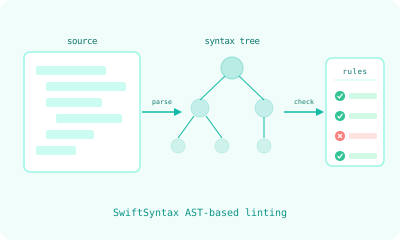
Sixteen custom Swift lint rules built on SwiftSyntax AST analysis, plus three smart CLI wrappers that find their config automatically.
Standard linters match text patterns. The rules in this package analyze the abstract syntax tree. When a rule says “body must have exactly one top-level view,” it needs to understand Swift’s syntax: what counts as a top-level view, what counts as a modifier chain, what counts as a conditional. SwiftSyntax gives each rule access to the actual parsed structure of the code, so the rules can express architectural constraints that text-pattern linters cannot.
The package contains 16 custom rules, 3 smart CLI tools, a directive suppression system, parallel file processing, and Xcode build phase integration. 112 tests cover rule triggers, non-triggers, edge cases, and fix-it suggestions — and the tool passes its own rule set on its own source.
Most linters stop at detection. This one closes the loop: violations carry fix guidance in the message itself, an ErrorFormatter emits Problem / Context / Fix errors an agent can act on, and a bundled skill maps each rule to a refactoring strategy. Detection, explanation, and remediation are one system.
One source of truth
A linting tool has a failure mode most linting tools have: the list of rules it enforces and the list of rules it documents drift apart. This package now defines every rule once, as data, in a registry the engine reads at runtime. The CLI’s --list-rules prints straight from it:
$ swiftskim --list-rules
Custom SwiftSyntax rules (16 total):
  skimmable_body        View/ViewModifier body capped at 15 lines
  one_top_level_view    body must have exactly one top-level view (if/else counts as one)
  excessive_nesting     AST nesting depth capped at 3 (relaxed inside #Preview)
  onchange_ignored_old_value  Use 0-parameter onChange when the old value is ignored
  ...
That registry is the fix for a real bug it exposed: one rule was dispatched under an internal name (prefer_zero_param_onchange) but emitted and suppressed under another (onchange_ignored_old_value), so filtering it by its documented name silently matched nothing. Naming a rule in exactly one place made the identity single-valued and the class of bug impossible. Enforcement you can trust starts with the tool agreeing with itself.
The rules
The sixteen rules group into four areas. Each enforces something a text-pattern linter cannot see.
View body
skimmable_body— a SwiftUIbodymay not exceed 15 lines, which forces extraction once it grows complex.one_top_level_view— a body must have exactly one top-level view, so the implicit result builder stays predictable.no_group_body— no bareGroupas a container unless it actually carries modifiers.no_if_modifier— bans the.if(condition) { ... }modifier, which breaks SwiftUI’s structural identity and its diffing.no_if_without_else— flagsifwithoutelsein a@ViewBuilder, where a view should not be deciding its own visibility.
View structure
view_structure_order— enforces member ordering in a View (embedded types → environment → other properties → init → body → methods).no_wrapper_body— flags abodythat only wraps a single subview and earns nothing.stack_minimum_children— aVStack/HStack/ZStackshould hold at least two children; a single child wants no stack.single_modifier_per_line— one SwiftUI modifier per line.
Code quality
excessive_nesting— caps nesting depth at 3, measured from the AST so it survives reformatting and relaxes inside#Preview.prefer_shorthand_optional_binding—if let foo = fooshould be the shorthandif let foo.onchange_ignored_old_value— use the zero-parameter.onChange(of:)form when the old value is ignored.
Imports & framework
preview_required— every file declaring aView,ViewModifier, orShapemust carry at least one#Preview.prefer_swift_testing— flags XCTest in favor of Swift Testing, with migration hints (XCTAssertEqualbecomes#expect(a == b)).no_exported_import— bans@_exported import, an unstable underscore-prefixed Swift API.blank_line_import_separation— a blank line between regular and@testableimports.
Architecture
Parallel AST processing
Files are processed concurrently via Swift’s TaskGroup:
Source files discovered
    ↓ filter by .swift extension
    ↓ exclude paths from .swiftlint.yml
    ↓ TaskGroup: one task per file
Each file → SwiftParser → SyntaxTree → visitors → violations
    ↓ aggregate
Sorted violation report
Smart config discovery
Three CLI tools (swiftformat-smart, swiftlint-smart, swiftskim) find configuration automatically:
- Check for an explicit
--configparameter. - Search the current directory (error if multiple configs found).
- Walk up the directory tree to root.
- Fall back to the package’s shared config.
Works from any directory in any project. No path configuration needed.
swiftskim also carries its own .swiftskim.yml — deliberately separate from .swiftlint.yml and .swiftformat, because its rules roll up on their own terms. It governs which custom rules run (disabled_rules / only_rules) and their two thresholds, while file selection stays shared from the SwiftLint config it already reads. An unknown rule id in that file is a hard error, not a silent no-op — the same “the tool agrees with itself” stance the rule registry enforces.
Directive suppression
Full SwiftLint-compatible suppression syntax with the swiftskim: prefix — deliberately distinct from SwiftLint’s own swiftlint: prefix, so SwiftLint’s superfluous_disable_command safety check still works (the earlier swiftlintcustom: prefix stays accepted as a legacy alias):
// swiftskim:disable:next skimmable_body
var body: some View { /* allowed to exceed 15 lines */ }

// swiftskim:disable excessive_nesting
// ... block region ...
// swiftskim:enable excessive_nesting
Xcode integration
Two-stage parsing works around Xcode’s build phase sandbox, which suppresses subprocess output. The tool detects the XCODE_VERSION_ACTUAL environment variable and adjusts output format. A shell wrapper re-echoes violations in Xcode’s expected format so they appear as inline warnings in the editor.
One engine, many surfaces — each verified before release
The same rule engine is delivered as a set of thin, skippable surfaces, so it meets a codebase wherever the work already happens:
- Command line —
brew install synodic-studio/synodic/swiftskim(tagged release; add--HEADto track the development branch), or build from source with a singleswift build -c release. - Xcode build phase — violations appear as inline warnings in the editor.
- SwiftPM library —
import SwiftSkim, conform your own types to theRuleprotocol, and run the engine over your project. - Editor and agent integration — a Claude Code plugin (with best-effort Codex and Cursor hooks) lints on every edit; a pi extension exposes the rules as callable tools.
The reliability problem with shipping one thing seven ways is that any one surface can quietly break while the others keep working. So a single release gate — verify-all.sh — exercises every surface end to end: it builds and tests the engine, self-lints the repo, drives the agent post-edit hooks against each agent’s documented payload, installs the Homebrew formula and runs it, consumes the library both from a local checkout and from the tagged release over the network, builds a Tuist demo app that imports and tests the library, and runs the whole consumer path inside a clean-room Linux container to prove nothing depends on a warm local machine. Running that gate before every release is what keeps any one surface from silently rotting between them.
Adding your own rules
The sixteen rules are opinionated on purpose, and the CLI deliberately takes no runtime rule plugins — dynamically loading compiled Swift into a linter is fragile, and avoiding it keeps the tool a single fast tree walk. So extensibility lives where it’s safe: the engine is vended as a SwiftSkim library, and a project that wants its own rule conforms to a Rule protocol and composes its own linter — the same “build your own tool” model the swift-syntax ecosystem uses. A custom rule runs in the same tree walk as the built-ins and inherits their suppression, id filtering, and output formatting for free, so it behaves exactly like a first-class rule. A complete ~60-line example linter (the built-ins plus a custom no_print_statements rule) ships in the repo, and the release gate builds a library consumer on macOS and Linux, so the extension seam is verified, not just asserted.
What to take from this
If you are building Swift quality tooling for a codebase larger than yourself, three patterns from this package are worth lifting:
Push opinionated rules into AST analysis. Anything you can express as “the structure of this code is wrong, regardless of formatting” should live as a SwiftSyntax visitor. Anything you can express as “this character pattern is wrong” can stay in SwiftLint. The split is real and the AST side is much smaller than you think.
Name each rule in exactly one place. The moment a rule’s identity lives in more than one file — the dispatcher, the help text, the docs — those copies drift, and the drift is invisible until someone filters by a name the tool no longer answers to. A registry the enforcer reads at runtime makes the documentation a projection of the truth instead of a second copy of it.
Make the CLI find its own config. Tools that require explicit --config flags get used wrong. Tools that walk up the directory tree to find their config get used right.
The full source is on GitHub at synodic-studio/swiftskim, MIT-licensed.