Alloy
/Metal GPU framework
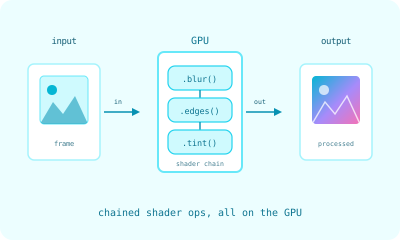
A Swift Metal framework for chaining GPU shader operations into image-processing pipelines. Powers the realtime camera-processing pipeline behind Gravity Well.
Alloy is the GPU image-processing framework I extracted out of Gravity Well, a science-exhibit installation that tracks glowing bouncy balls in real time using astronomical cameras. The exhibit needs to demosaic raw Bayer sensor data, run blob detection, extract centroids, and render visualization overlays in realtime on hardware that ranges from a current Mac mini to five-year-old machines. Doing that in CPU-side Swift was a non-starter. Doing it in raw Metal was painful enough that I built a builder-pattern wrapper instead.
That wrapper is Alloy. It runs on macOS 14 and later, has zero external dependencies, and lets me write a complete image-processing pipeline as a single chained expression.
The Builder Pattern
A typical pipeline looks like this:
import Alloy

guard let engine = CommonMetalEngine() else { return }

let result = try engine
    .withRawData(width: 1024, height: 1024, bitDepth: 16)
    .debayerRGGB()
    .grayscale(strategy: .luminance)
    .blur(radius: 3)
    .execute(data: rawSensorData)
Every step in that chain is a Metal compute shader. The framework wires the textures from one shader to the next without round-tripping through main memory, so the data stays on the GPU until you ask for it. execute is the only thing that triggers a CPU-side wait.
For pipelines that start from already-decoded image data:
let cropped = try engine
    .withRGBAData(width: 512, height: 512)
    .squareCrop(center: (x: 256, y: 256), sideLength: 200)
    .donutMask(innerRadius: 20)
    .execute(data: rgbaData)
Result objects expose both the underlying MTLTexture for further GPU work and an asNSImage() helper for handing the result off to a SwiftUI view.
What’s in the Library
A dozen shader operations cover the image-processing primitives I actually needed:
- Debayer. RGGB Bayer pattern demosaicing for both 8-bit and 16-bit raw sensor data.
- Grayscale. Luminance conversion with eight different weighting strategies.
- Blur. Gaussian blur with configurable radius.
- Erosion. Morphological erosion in 4-connectivity or 8-connectivity, one to twenty iterations.
- Invert. Color inversion.
- Noise. Random noise injection for stress testing.
- Peak detection. Local intensity maxima with threshold filtering.
- Square crop. Region extraction around a center point.
- Donut mask. Circular mask with configurable inner and outer radii.
- HSV position. HSV-to-position mapping for visualizations.
- Color sampling. GPU-accelerated color extraction at arbitrary positions.
- Connected components. Blob detection with centroid calculation.
Each operation is a .metal shader plus a thin Swift wrapper that conforms to a common protocol. Adding a new operation is a contained piece of work, which is the property I cared most about when designing the API.
Type-Safe Pipelines with Phantom Types
The builder above is convenient, but it will happily let you write nonsense. Erosion and connected-components analysis only mean anything on a binary image — white blobs on black — yet nothing stops you from calling .erosion() on a full-color frame, or debayering data that was never Bayer in the first place. Those mistakes compile. They just produce plausible-looking garbage at runtime, which is the worst kind of bug to chase on an exhibit floor.
So I added a typed frontend that pushes the image’s state into the type system using phantom types — marker types that carry meaning at compile time but hold no data at runtime. A Pipeline<State> knows whether it is currently holding a color image, a grayscale one, or a binary one, and each operation is offered only in a constrained extension where that state makes sense:
let blobs = try Pipeline
    .rgba(width: 512, height: 512)   // Pipeline<ColorImage>
    .blackAndWhite(threshold: 0.5)   // Pipeline<Binary>  — thresholding is what unlocks binary ops
    .erosion(iterations: 2)          // offered only where State: BlackAndWhite
    .connectedComponents(on: frame, maxComponents: 20)
Try to erode before you threshold, and it is no longer a runtime surprise — it is a compile error, in the compiler’s own plain words:
error: referencing instance method 'erosion' on 'Pipeline'
       requires that 'ColorImage' conform to 'BlackAndWhite'
The states are the vocabulary. A future image state that should be erodable simply conforms to BlackAndWhite and inherits the operation for free, so the safety net grows without special-casing. The typed layer sits on top of the untyped builder — same shaders, same GPU execution path, byte-identical output — so nothing that already worked has to change. What changes is that a whole class of ordering mistakes stops being possible to write. It is the pattern I am happiest with in the whole framework, because it moves a category of bug from “debug on the exhibit” to “does not build.”
This is not a demo sitting off to the side. Gravity Well’s own detection engines are built through these typed pipelines: the sequence that turns a raw camera frame into ball positions — crop, mask, threshold, erode — is a single typed expression, so a mis-ordered stage can’t reach the exhibit floor. The typed layer builds the engine once and hands it back for the 30-frames-per-second loop to reuse, so the safety is free at runtime: the per-frame work is exactly what it always was.
Why Builders, Not Render Graphs
I considered modeling Alloy as a render-graph framework like MPSGraph. I did not, for two reasons.
The first is that builder chains are debuggable in a way that render graphs are not. If the output looks wrong at frame 47, you can comment out the last step in the chain, run again, and see what the input to that step looked like. With a graph, you have to reach for tooling.
The second is that Alloy’s pipelines are short. The longest one in production has eight steps. At that depth a builder reads top to bottom like a recipe, and the optimization wins of a graph framework do not justify the API surface.
Performance Characteristics
The reason Alloy exists is that the camera-tracking pipeline runs in realtime on five-year-old hardware. The pipeline is roughly: 16-bit raw Bayer in, debayer, grayscale via a custom luminance formula tuned to the fluorescing ball colors, donut mask, threshold, morphological erosion, connected-components blob detection, centroid extraction, color sampling. On the production exhibit hardware it stays comfortably inside the camera’s frame budget, with the GPU spending most of its time idle waiting for the camera. The pipeline could run faster than the camera can deliver frames.
Most of the performance is a function of staying on the GPU the whole time. The other half is small choices that add up: keeping textures in tile memory where possible, picking shader formats that match the camera’s native output, batching connected-components passes so the centroid calculation is one dispatch.
What to Take From This
If you are building a Swift Metal pipeline that needs to run on real hardware in production, two patterns from Alloy are worth lifting:
Wrap Metal’s verbosity with a builder. Raw Metal is a pile of MTLCommandBuffer and MTLComputeCommandEncoder calls and pipeline state objects. A builder that takes care of the boilerplate makes the actual image-processing logic readable.
Keep textures on the GPU. Every CPU round-trip costs you. Alloy’s API is designed so you have to opt into a CPU-side result by calling execute, which makes the cost visible at the call site.
The full source is on GitHub at synodic-studio/alloy, MIT-licensed.